
My vision was to create a festive composite video of short, diverse video clips that would represent the various ways our customers are making an impact. This could not have been done without the help of the wonderful organizations who have given their consent for us to use pieces of their community-generated content. We are so grateful.
I was excited to share this fun, meaningful holiday message with our audience. And after sending it to our email list, I quickly received several responses like these:


I was struck by these flattering responses from these kind individuals. While creating this video had certainly been a process, I felt the need to shout from the rooftops that I hadn’t used any fancy equipment or attended any specialized training to make this video happen. In fact, I am certain every single one of YOU can make a similar composite video for your organization if you just knew the behind-the-scenes process!
So, let’s dig in into the 5 steps I took to make this composite video, and the technology tools that helped me along the way:
Step 1: Spark Ideas With ChatGPT
It all started with one idea – I had seen a few examples on LinkedIn of people rewriting classic songs or tales that included a twist that made it relevant to their organization, and I decided to give it a try!
Here is the first prompt I inputted:
Can you write a version of “twas the night before christmas” from the perspective of a technology company who helps nonprofits collect impact stories?
The immediate result was incredible, with top-notch references to “code”, “data pipeline” and “the cloud”. But after reading the first iteration, I realized I needed to be a little more specific about the type of impact we make, so I inputted a follow up prompt:
Can you rewrite it to include more references to the type of work nonprofits do? Like planting trees, feeding the homeless, providing housing, giving resources to veterans and making families’ holiday season brighter?
The second iteration fabulously intertwined the themes I’d hoped for, and my creativity had been sparked! I copied and pasted the result into a word document and began switching out generic words in lieu of words specific to our brand. Here are a few examples:
- “Database” became “Story Bank”, to reference where our customers organize their collected content.
- “The servers” became “the slack channels”, where our team communicates on a daily basis.
- “Our CEO in their hoodie” became “Our CEO in their Sabres hoodie”, which he famously wears in our Buffalo office for good luck.
I ultimately decided that keeping the full poem would be too long for a short-form video, and cut down the amount of stanzas until I had about 200 words without sacrificing rhyme or rhythm.
Step 2: Capture Crystal Clear Audio With a Voice Recorder
One essential aspect of a great video is crystal clear audio. People are willing to watch a video that’s a bit grainy, but indistinct audio is enough to make someone hit the “X” button within a few seconds.
For this video, I recorded the audio using my microphone and the voice recorder provided on my laptop. But don’t feel the need to purchase equipment – the voice memo app on your smartphone will do the trick as long as you do not have background noise. If you’re unsure if your audio will be clear enough, be sure to do a test. The last thing you will want to do is re-record later!
Step 3: Add & Trim MemoryFox Videos In Canva
It was time to start finding, trimming and combining the video clips. Personally, I love using Canva for projects like these for two reasons: the platform is extremely user-friendly, and their premium features are available to nonprofits for FREE. Here are the steps I took in Canva:
- First, I opened a new “Instagram Reel” size design. For this project, I knew I wanted the videos to cover the entire design (no boarder, graphics or logos), so I did not use a template – I used a blank design.
- Next, I added several pages to the design, because I knew I’d need one page per video clip. I uploaded my voice recording and dragged it into the design.
- Then, I set out to find 10-15 videos that I could trim down to 3-7 seconds each. Thankfully, since MemoryFox is integrated with Canva, it was simple to drag and drop videos directly into my design.
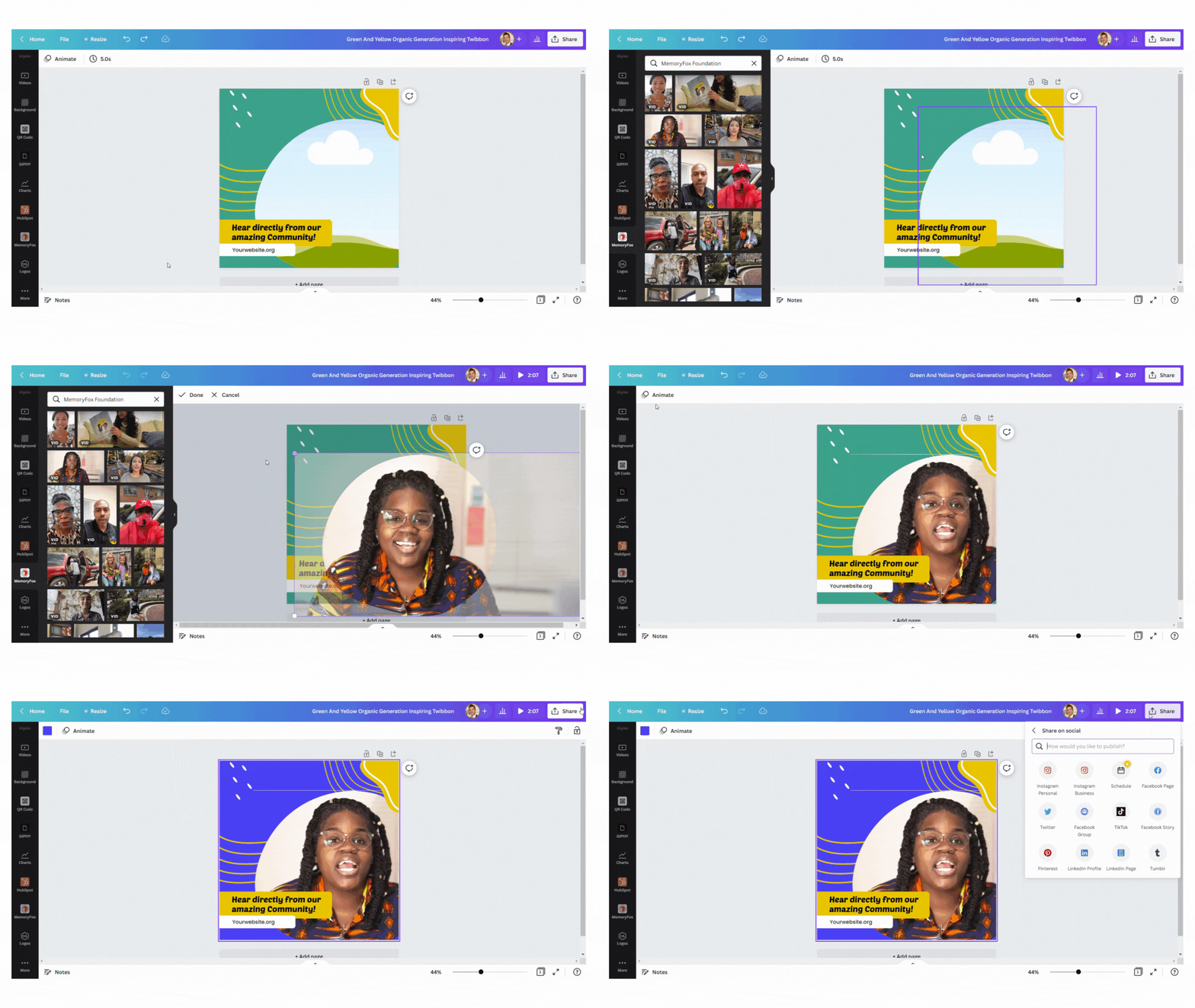
- Next, I set the sound on the videos to 0. This is crucial so the original sound would not layer on top of the voice recording.
- Then, I began trimming the video clips. I started by trimming them to the most visually interesting portions of the videos, and then began matching them up with natural transitions in the voice recording. To make it extra fun, I moved the order of the clips so they would match with the theme of lyrics and to show different missions back-to-back.
- As the last step, I added a holiday-themed tune to the completed video. I turned the volume on the song down substantially so it would not overpower the original audio.
Step 4: Add Accurate & Editable Captions With TikTok
With the cultural popularity of this sing-song poem, it was extremely important to me to have captions on the video so people would see the unique changes made to the lyrics. The easiest (not to mention free) way to add accurate, editable captions to your video is through TikTok.
I uploaded my Canva video to TikTok, and began editing. Simply click “Text”, then “Captions”, and TikTok will analyze your video and auto-generate matching words. I love using TikTok for captions because you can edit them before posting your video (unlike other platforms that offer to add closed captions while it uploads your video to their site). I took a few minutes to edit the captions to ensure accuracy – things like the spelling of proper nouns like “MemoryFox” often need a quick fix.
Also unlike other social media platforms, TikTok lets you edit the style and placement of your captions, which adds to the visual appeal of your overall video! When you’re putting captions over a composite video, it’s essential to pick a style and placement that is easy to read over top of every different video clip. I recommend watching the video again in its entirety before moving to the next step.
Finally, it’s time to download your captioned video. Recently, TikTok has granted you the ability to download videos without the watermark, but you MUST download it while it’s still in draft form. This is a wonderful feature because you never actually have to share the video to your TikTok account – just save your creation as a draft, reopen it in the editor, and you’ll see the download arrow option along the right side of the screen.
Step 5: Compress The File & Share!
Here is one obstacle I did not foresee – Once I downloaded the video from TikTok (without the watermark), the file was so large that it wouldn’t upload to LinkedIn. LinkedIn this was the first platform I tried, but I suspect it would have been a challenge on other platforms as well. I realized I needed to compress the file so it would be easy to share.
To compress the video, I followed the following steps:
- I opened the built-in video editor on my laptop called Microsoft ClipChamp, but you could get the same result by uploading your captioned video to Canva.
- Imported the video.
- Exported the video in 720 pixels.
Once I had my social media-friendly sized video, I shared it across all channels and with our email list. And there you have it! With a little extra time and massive help from tech tools like MemoryFox, your organization can bring your mission to life through a fun and uplifting composite video.